Cariva™ Caregiver Platform

Project: Cariva™ All-in-One Caregiver Platform

Created for: Google’s UX Design course

Prompt: Design an app and a responsive website for a hospital's caregiver support program to help family caregivers coordinate medication schedules, communicate with care teams, and share updates with other caregivers or family members.

Status: In progress

TL;DR

Caregivers, such as an adult child taking care of an aging parent or a parent taking care of an ill child, get overwhelmed with their myriad responsibilities. They tend to use multiple tracking apps, such as tracking apps for medications and symptoms and MyChart-type apps for medical records and communicating with healthcare providers. It is extremely difficult to manage multiple apps on top of doctors’ appointments. Health information can be confusing and difficult to remember.

Caregivers frequently experience guilt. They may feel like they aren’t doing enough for their loved one. They beat themselves up for missing something or forgetting to do something.

And caregivers are exhausted both physically and mentally. They attend doctors’ appointments and update family members on the loved one’s condition.

What if there were an app that consolidated medication and symptom tracking, medical records, communicating with healthcare providers, and sharing updates with other caregivers or family members?

That’s what Cariva™ is intended to do. Cariva™ is being designed to be an all-in-one platform that reduces overwhelm, guilt, and exhaustion in caregivers. It would give peace of mind to caregivers that they are up to date and on top of their loved one’s needs.

Research Questions

Since this is a project for a course and not (yet) a real product, I conducted research online and using Claude AI.

My primary questions were:

  1. What do caregivers do for their loved one?

  2. What are caregivers’ goals in taking care of a loved one?

  3. What are caregivers biggest frustrations when caring for a loved one?

  4. What kind of support do caregivers want and need?

What do caregivers do for their loved ones?

  • Medical and health management (scheduling and attending appointments, managing medications, communicating with healthcare providers, tracking symptoms and changes, understanding and translating med information for the patient and other family members)

  • Helping with ADLs (Activities of Daily Living)

  • Logistics and coordination (transportation to and from appts, coordinating with other caregivers, managing insurance and billing, arranging home health aides, handling legal and financial matters)

  • Emotional support

  • Monitoring and safety (watching for falls, changes in condition, medication errors, signs of decline)

What are caregivers’ goals in taking care of a loved one?

  • For loved one: Keeping them safe, comfortable, and as healthy as possible. Preserving person’s dignity and sense of independence as long as possible. Honoring the person’s wishes.

  • For the care situation: Staying on top of everything so nothing falls through the cracks. Feeling informed and prepared rather than reactive and scrambling. Coordinating well with other family and healthcare providers.

  • For themselves: Feeling like they’re doing enough (avoiding caregiver guilt). Maintaining a sense of sense and managing their own lives. Avoiding burnout.

  • Longer term: Having no regrets.

What are caregivers’ biggest frustrations when caring for a loved one?

  • Information is scattered and hard to access

  • Healthcare tools tend to be designed for patients, not caregivers

  • Communication gaps with care teams — Caregivers often feel like they’re on the outside of conversations happening about their loved one

  • Coordination with other family is messy: Text threads, phone tag, someone always out of the loop, conflicting info, emotional landmines of family dynamics

  • No single source of truth

  • Invisible mental load: Constant background hum of worry, tracking, and anticipation. No off switch. Apps that require a lot of cognitive effort to use add to that load.

  • Feeling invisible to the healthcare system. Caregiver is often the one implementing everything the provider recommends. Rarely get acknowledgement, support, or direct line of communication.

  • Guilt and inability to “do enough”

What kind of support do caregivers want/need?

  • Info that’s clear and actionable: Plain-text translated summaries of what matters right now. What changed since last appt. What to watch for. What the med does and why it was prescribed. Don’t need to be experts; need just enough info to make good decisions and ask good questions.

  • One place where everything lives: Single, reliable, up-to-date source of truth for meds, appts, diagnoses, care instructions, and contacts. Relief of knowing they don’t have to remember everything or hunt across five different platforms.

  • A way to coordinate with other caregivers without drama: Shared view of what’s happening, who did what, what’s coming up — without requiring family members to negotiate over a text thread. Structured enough to be reliable, simple enough that a non-tech-savvy family member will actually use it.

  • To feel seen and heard by healthcare system

  • Proactive alerts, not just reactive info: Reminders for refills, alerts for upcoming appts, flag when something in the record changes — so they can anticipate rather than play catch-up

  • Emotional acknowledgment built into the experience

  • Confidence, not just info: Don’t know what they don’t know. App has their back, that it will catch what they might miss, that they can trust it. (Design trust problem as much as a features problem)

  • Boundaries and sustainability: Support for the caregiver’s own wellbeing, reminders to rest, acknowledgement that they matter, too.

Caregivers need a tool that treats them as the primary user, reduces cognitive load, creates a reliable shared source of truth, and acknowledges the emotional weight of what they’re doing.

Competitive Audit

I examined three competitors (two direct, one indirect) to explore what other platforms are currently doing and what opportunities there are to make Cariva™ better.

Caring Village [direct]

  • Share “village” around one loved one

  • Role-based permissions

  • Shared calendar

  • Task lists

  • Med tracking with photos

  • Encrypted messaging

  • Secure doc storage

  • AI assistant (Julia) for caregiving guidance

Connected Caregiver [direct]

  • Shared to-do lists

  • Calendars

  • Secure doc storage

CaringBridge [indirect]

  • Sharing updates, photos, care needs — semi publicly

GAP/OPPORTUNITY

  • None of the above appears to integrate directly with clinical health records like MyChart/Epic vis FHIR

  • They manage caregiver-generated data (tasks, notes, schedules) but don’t pull and translate clinical data from the patient’s med record into caregiver-friendly view

  • What Caring Village does for coordination + what MyChart has in terms of clinical data — but redesigned with the caregiver, not the patient, as the primary user

Empathy Map

Synthesizing our research revealed three consistent themes across both personas — scattered information, communication friction, and invisible caregivers. The empathy map captures these tensions.

Click to expand.

User Personas

I created two primary users for Cariva™: Maria, an adult child taking care of her aging mother, and Patty, a parent taking care of her ill child.

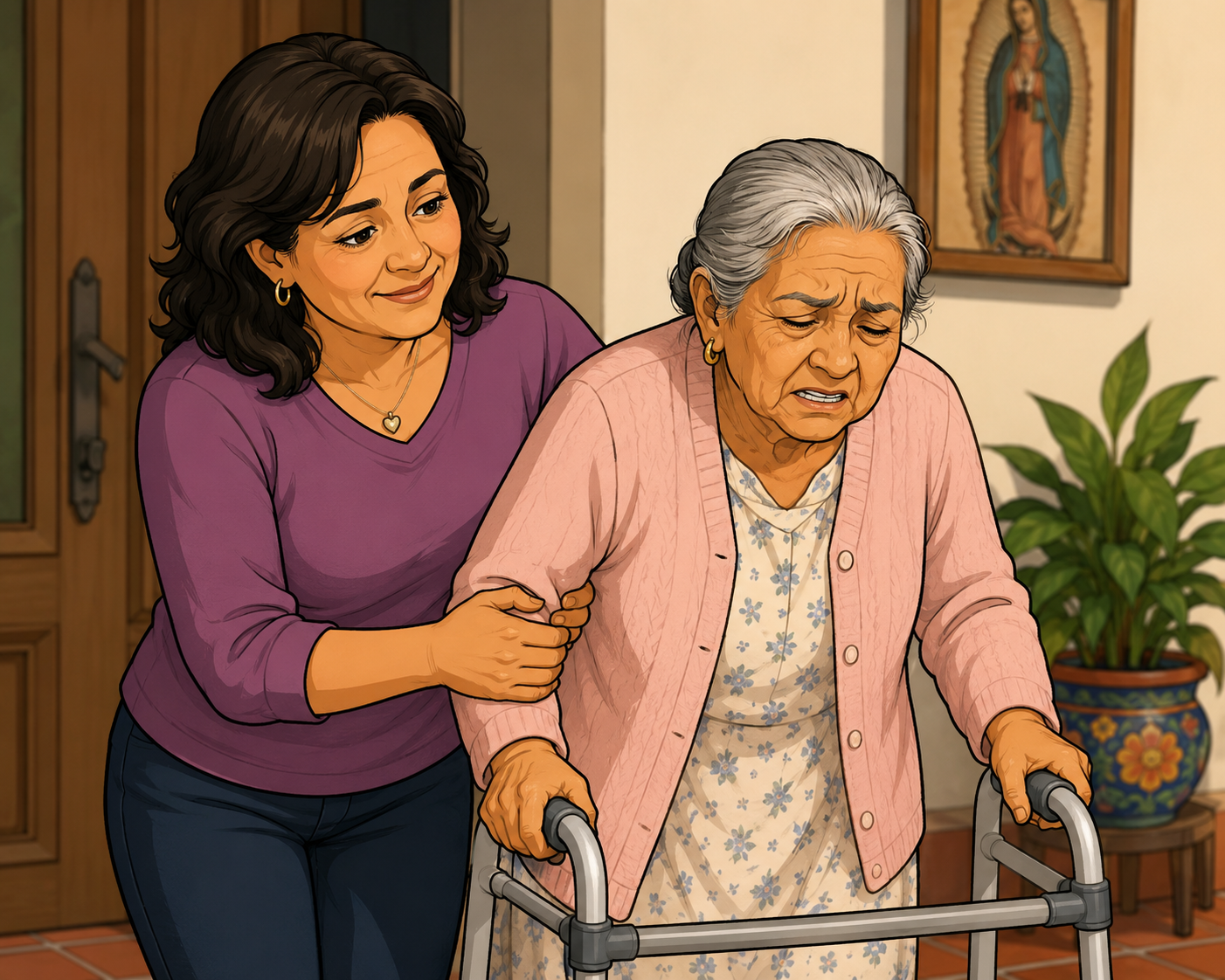
Midlife Mexican-American woman

User 1: Maria

Name: Maria Gonzalez

Age: 52

Education: Associate’s degree

Occupation: Legal assistant

Family: Husband, two kids aged 15 and 12, mother Rosa (81, dementia, type II diabetes, COPD), brother Michael

Biography

Maria has worked as a legal assistant for 14 years at a mid-sized Houston law firm. She's meticulous, process-driven, and used to managing complex information under pressure. Two years ago, after her mother Rosa's dementia diagnosis made living alone unsafe, Maria and her husband converted their spare bedroom and moved Rosa in. What she thought would be hard has turned out to be harder than she imagined — not because she doesn't love her mother, but because the logistics never stop, the mental load is constant, and the healthcare system wasn't built with her in mind.

Image created with ChatGPT.

Goals

  • Keep Rosa safe, comfortable, and dignified for as long as possible

  • Stay on top of meds, appointments, and symptoms without anything falling through the cracks

  • Keep Michael genuinely informed so that when he comes home, he can actually help rather than needing a week to get caught up

  • Carve out enough mental space to still be present for husband and kids

  • Feel confident that she’s not missing something important

Frustrations

  • Rosa’s medical information is scattered across MyChart, a pharmacy app, and Maria’s own handwritten notes

  • MyChart wasn’t designed for a caregiver. She’s navigating a proxy account through a system built for the patient.

  • When Michael comes home, Maria has to verbally download a month of medical history to him

  • She often leaves doctor’s appointments realizing she forgot to ask something important

  • She googles medication interactions at midnight because there is nowhere else to ask

  • The healthcare team talks to Rosa, who can no longer reliably relay info, rather than to Maria

Technology profile

Comfortable with smartphones and app. Uses her phone for work email, calendar, and navigation daily. Dislikes apps that require a lot of setup, send too many notifications, or make simple tasks take multiple steps. If an app doesn’t make her life easier within the first few uses, she deletes it.

User story

  1. As a family caregiver, I want to track my loved one’s medications, symptoms, and appointments and communicate with her healthcare team in one place so that I can stay on top of her care without feeling overwhelmed or constantly afraid of missing something important.

  2. As a family caregiver, I want to share real-time updates about my mother’s condition with my brother so that he can stay informed and step in as a true partner when he’s available without my having to repeat everything from scratch.

I just need one place where everything lives so I’m not carrying all of this in my head.

Maria’s User Journey Map

Maria's user journey map across five phases — Morning routine, at work, doctor's appointment, evening coordination, and communicating with the care team — showing tasks, feelings, and design opportunities at each stage.

Click to expand.

Maria’s Problem Statement

Maria is a working family caregiver who needs a single, reliable place to track her mother's medications, symptoms, and appointments and communicate with her care team because the cognitive load of managing complex medical information across scattered systems — while also holding down a job and raising two kids — leaves her constantly overwhelmed, under-informed, and afraid of missing something critical.

30-something white woman with a ponytail

User 2: Patty

Name: Patty Jones

Age: 33

Education: Bachelor’s degree in computer science

Occupation: Stay-at-home mom and caregiver

Family: Wife Susan (VP at a tech company), son Jack (8, healthy), son Dylan (6, severe cerebral palsy and co-existing conditions)

Caregiver situation: Primary caregiver for Dylan, who requires 24-hour supervision. Rotating home health aides cover 7am–7pm daily. Patty manages Dylan alone overnight. Susan participates actively on evenings and weekends.

Biography

Patty has a bachelor's degree in computer science and spent several years in tech before Dylan's diagnosis made full-time caregiving her reality. She and Susan made the decision together — Susan's income as a VP comfortably supports the family, and Patty's organizational skills, technical fluency, and fierce attention to detail make her extraordinarily effective as Dylan's primary caregiver and de facto case manager. What she didn't expect was how isolating it would feel. Jack is thriving, Susan is supportive, and the household is financially stable — but Patty spends most of her waking hours managing a level of medical complexity that would challenge a trained nurse, with none of the institutional support that nurses have.

Dylan was diagnosed with severe cerebral palsy at 18 months, following a perinatal brain injury. He is nonverbal, bed-bound, and dependent on a G-tube for nutrition and an oxygen concentrator for respiratory support. He has a co-occurring epilepsy diagnosis, and his seizures — which can happen at any time, including overnight — are Patty's greatest source of anxiety. Managing Dylan means managing a rotating team of home health aides, a large specialist roster (neurologist, pulmonologist, gastroenterologist, physiatrist, palliative care), a demanding equipment and supply chain, and a medication and feeding schedule that leaves no margin for error.

Image created with ChatGPT.

Goals

  • Keep Dylan safe, comfortable, and as engaged with his world as his conditions allow

  • Maintain accurate, real-time records of Dylan's seizures, vitals, feeding, and medications so his care team has the data they need to make good decisions

  • Ensure every home health aide — regardless of which one shows up — has complete, current information at the start of each shift

  • Communicate efficiently with Dylan's large specialist team without spending hours on hold or repeating the same information to multiple providers

  • Protect her own sanity and be meaningfully present for Jack and Susan, not just physically there

  • Feel like a true partner to Dylan's medical team, not just a relay point for information

Frustrations

  • Rotating aides mean she is constantly onboarding — every shift handoff risks a gap in care if the aide doesn't have current information

  • Dylan's specialist team is siloed — the neurologist doesn't know what the pulmonologist said, and Patty is the only thread connecting them

  • Seizure logging is urgent and one-handed — current tools require too many taps when she's in the middle of a seizure event

  • Overnight monitoring is exhausting and lonely — equipment alarms, oxygen saturation drops, and seizure watches mean she rarely sleeps deeply

  • Despite her technical background, she hasn't found a single app that handles Dylan's level of medical complexity without feeling like it was designed for a much simpler use case

  • Jack sometimes gets the leftover version of his mother — the tired, distracted one — and Patty carries significant guilt about that

Technology profile

Highly proficient. Comfortable with complex software, APIs, integrations, and connected devices. Has attempted to build her own tracking spreadsheets and has evaluated most caregiving apps on the market, finding all of them insufficiently robust for Dylan's needs. Will adopt new tools quickly if they demonstrably reduce her workload — and will abandon them just as quickly if they add friction instead. Has strong opinions about UX and will notice bad design immediately.

User story

As a primary caregiver for a medically complex child, I want to log seizures and vitals in real time, coordinate seamlessly with rotating home health aides, and communicate with Dylan's specialist team from one platform so that I can ensure nothing critical falls through the cracks during shift handoffs or overnight monitoring.

I have a CS degree and I still can’t find an app that keeps up with Dylan’s care. I shouldn’t have to build it myself.

Patty’s User Journey Map

Patty’s user journey map across five phases — Morning shift handoff, managing care remotely, evening shift handoff, overnight monitoring, and communicating with a team of specialists— showing tasks, feelings, and design opportunities at each stage.

Click to expand.

Patty’s Problem Statement

Patty is a technically skilled stay-at-home caregiver for a medically complex child who needs a robust, real-time system to log seizures, track vitals and medications, coordinate with rotating home health aides, and communicate across a large specialist team because the stakes of a missed data point — a skipped medication, an unlogged seizure, an aide starting a shift without current information — are too high to manage through scattered apps, handwritten notes, and sheer force of will.

Hypothesis Statements

Maria

If Maria has a unified platform to track her mother's medications, symptoms, and appointments and communicate asynchronously with her care team, then she will feel less overwhelmed, more confident that nothing critical is falling through the cracks, and better able to be present at work and at home.

Patty

If Patty has a real-time care dashboard with one-tap logging, automated shift handoff summaries, and cross-specialist communication tools, then she will experience fewer critical information gaps, feel less anxious during overnight monitoring, and have enough mental bandwidth to be more present for Jack and Susan.

Goal Statements

Maria

Our caregiver app will let family caregivers track medications, symptoms, and appointments and communicate directly with their loved one's care team in one place, which will affect working family caregivers like Maria by reducing the cognitive load of managing complex medical information across scattered systems and giving them confidence that nothing critical is being missed. We will measure effectiveness by tracking reductions in self-reported caregiver stress, decreases in missed medications or appointments, and improvements in caregiver-reported confidence in communicating with care teams.

Patty

Our caregiver app will let primary caregivers of medically complex children log seizures and vitals in real time, generate automated shift handoff summaries, and communicate across a large specialist team from a single platform, which will affect high-acuity caregivers like Patty by reducing critical information gaps between rotating aides and siloed providers and decreasing overnight anxiety. We will measure effectiveness by tracking reductions in handoff errors reported by aides, decreases in time spent compiling information for specialist calls, and improvements in caregiver-reported overnight confidence and sleep quality.

Ideation

After brainstorming a handful of How Might We questions, I organized the questions into five categories then started ideating ways to answer the questions.

Information management

  • How might we give caregivers one reliable source of truth for their loved one's medical information without requiring them to manually enter everything from scratch?

  • How might we surface only what's most relevant right now so caregivers aren't overwhelmed by data they don't need in the moment?

  • How might we automatically generate a care summary that's ready to share with any provider, aide, or family member on demand?

Coordination and handoff

  • How might we make shift handoffs between rotating aides feel seamless and complete, even when the aide has never cared for Dylan before?

  • How might we keep secondary caregivers, e.g., a spouse or a sibling, genuinely informed without creating extra work for the primary caregiver?

Urgent and high-stakes moments

  • How might we make logging a seizure fast enough to use with one hand, in the dark, under stress?

  • How might we help caregivers feel confident overnight when professional support isn't present?

Communication with care teams

  • How might we help caregivers communicate with multiple specialists without repeating the same information to each one?

  • How might we reduce the friction of reaching a provider so caregivers can get answers before a concern becomes a crisis?

Emotional load

  • How might we design an experience that acknowledges the caregiver, not just the patient, as someone whose wellbeing matters?

  • How might we reduce the background anxiety of caregiving without requiring caregivers to actively do anything extra?

User Flows

Medication logging and tracking

Click image to expand

The task: Maria wants to log Rosa's morning medications quickly and confirm everything was given.

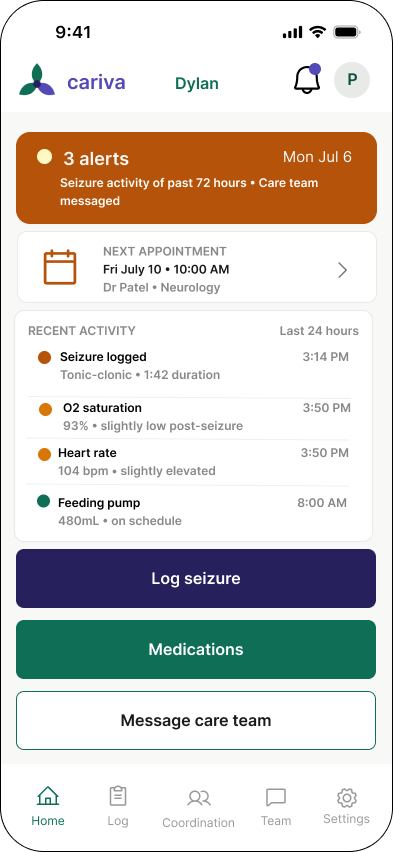
The flow: When Maria opens the Cariva™ app, she lands on the home dashboard where she sees Rosa’s daily care summary and an option to log medications. She taps “Log medications” and is taken to a screen with today’s medication list, identified as skipped, taken, or to take. She can select more than one medication at a time to log and goes to a confirmation screen. A medications circle on the home page, a sort of pie chart showing how many medications Rosa has taken that day vs how many are left to take, fills to show that Rosa has just taken some of her meds.

Seizure logging

Click image to expand

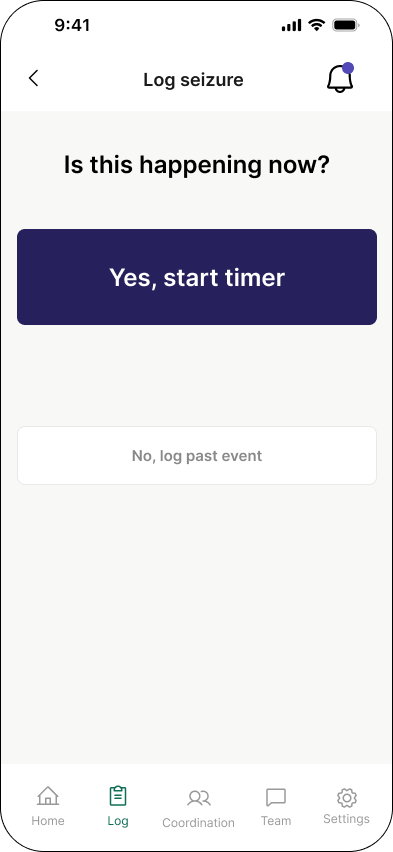
The task: Dylan begins seizing. Patty needs to log the seizure in real time — capturing start time, duration, and type — while staying present with Dylan.

The flow: Patty has an option to add Cariva™ as a widget on her home screen or lock screen. She can easily set it up so that tapping the widget takes her directly to the log seizure screen. If she opens the app to the home dashboard, she can tap “log seizure” from there. When she taps, a running timer immediately starts, and the screen displays a prominent “Stop” button. When the seizure is done, Patty can add information, such as seizure type and notes. If Patty forgets to stop the timer, an alert sounds when five minutes have passed.

Shift handoff summary

Click image to expand

The task: The morning aide arrives at 7am. Patty needs to hand off Dylan's overnight summary so the aide can take over confidently and completely.

The flow: When Patty opens the app around 7am, she sees a “Handoff ready” notification on the home dashboard. The system has auto-generated a handoff summary that Patty will share with the home health aide, with the option to add notes. The aide must tap “I’ve reviewed this handoff” to complete the process.

Multi-provider messaging

Click image to expand

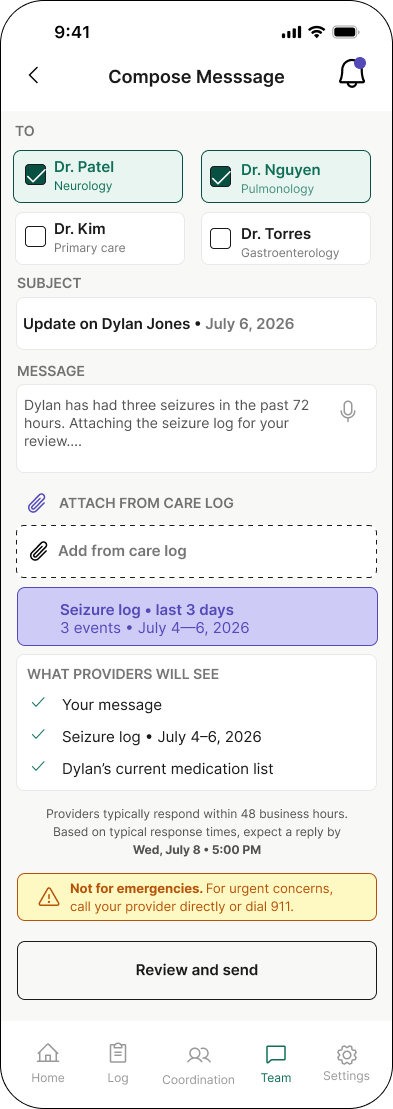
The task: Maria has noticed that Rosa has been more confused than usual for the past three days and has had a slight fever. She wants to message Rosa's primary care physician and neurologist simultaneously, attach relevant data from Rosa's care log, and receive their responses in one unified thread.

The flow: When Maria opens Cariva™, she sees Rosa’s care summary with a flagged trend of higher-than-normal temperatures. She taps “Message care team,” and the message screen displays a roster of Rosa’s care team. Maria can select as many providers as she wants, and they will all receive the message in their own systems. In composing a message, Maria can attach Rosa’s care log and her own notes. When providers reply to the message, Maria and other providers will see all replies in a single thread.

Information Architecture

Click image to expand

Information architecture diagram for Cariva™ showing nine main sections including log in/registration, home dashboard, care log, care team, appointments, patient portal, caregiver coordination, notifications, and settings, each with three child screens.

Wireframes

Home dashboard

Click image to expand

Three options for home dashboard with stars by preferred elements.

Next Up

  • Ideation

  • User Flows

  • Information Architecture

  • Wireframes

  • Prototype